There are a slew of webpages I want to save as PDF. They’re not all linked to from the same page; there is a hierarchical structure, so I’m going to need to click, save all as PDF, go back, go down a link, etc. @WEB Extract & Process Links on Web Page Using HTML Class [Example] (Using the PDF print procedures at @PDF Save (Print) Web Page for Each Link on Web Page as Individual PDFs [Example]) almost does I want, except 1) I have to input the URL that the links are on into the macro itself. That’s tedious; I would like it to use the frontmost webpage (or, alternately, somehow drill down and print all links recursively, but that’s almost certainly too much to ask). And 2) It errors out almost immediately with “Open URL failed.” This happens even when I leave the original URL that is baked into the macro. I don’t have Chrome, but this happens whether I change the browser in the macro to either Brave or Safari.
I am brand spanking new to Keyboard Maestro, and am hoping to not have to go through a big learning curve before I can make this work. Thanks in advance!
I asked AI, and it said this was a trivial problem. It doesn't even require Keyboard Maestro. All you have to do is issue this command: (this will download all the links on a single example page)
wget -A pdf -m -p -E -k -nd -e robots=off http://example.com/
If you want to go recursive, you will need this:
wget -r -l 1 -H -nd -A pdf https://example.com/
If you want to use KM, all you have to do is put that command into an Execute Shell Script action. Make sure you specify your working directory before executing that command.
I will let you look up the explanation for the options that I used in that command.
The wget program is obtainable using the following command:
brew install wget
This of course means you have to get brew installed first.
I didn't test this solution because I don't use brew or other software. So do your own research before testing my commands.
If you don't like this approach, there are several other possible approaches, including Javascript, Python, and maybe curl.
I didn't read the macro on the website you cited, because that seemed like a lot of work for me.
You'll need a set of rules for this -- if you follow every link on a page, and every link on the pages you've gone to, and so on... You could end up PDFing the entire internet!
You could stop on a "depth" condition, you may only want to go to pages with the same Fully Qualified Domain Name, etc.
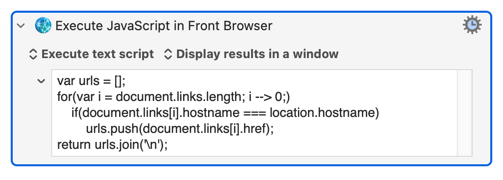
Then you just(!) use JavaScript to get all the required links from the document -- return them as a one-per-line list and you can "For Each" them in KM, opening/exporting/closing each link in turn. This Action will get you started:
Okay, let me see if I can get the original macro to work before I start messing with it. The problem I’m running into now is that the macro asks for an HTML class, but I don’t see a class on the page in question; I see an ID. Is there a way to fix this?
Don't. Start again, maybe using the original for ideas.
Lots of things have changed since that thread was started, and you may find that KM has gained capabilities that will make writing a new version easier.
Start by defining your problem -- particularly what links you will follow and any "stop" conditions -- and see what you can do with @ComplexPoint's version of the JavaScript "link grabber".
 and it said this was a trivial problem. It doesn't even require Keyboard Maestro. All you have to do is issue this command: (this will download all the links on a single example page)