Searching for a way to paste a markdown like link into apple notes

I tried the using the excellent Copy as Markdown link (which I use multiple times a day) by @ComplexPoint but pasting simply results in the literal version of the markdown link as shown below

I also tried copying a link from Apple Notes which looks like a markdown link and paste it into BBEdit, but it only resulted in the URL without the title and without any indication of the syntax of the link.

thank you very much !

You would have to show us what you mean, specify versions, and ask a question before we can really answer.

With the current version, (see GitHub - RobTrew/copy-as-md-link: macOS Keyboard Maestro macro group – single keystroke to copy MD links from different applications.)

I am not able to reproduce anything resembling what you describe.

(links are pasting into Apple Notes as formatted hyperlinks, we are able to create links to the selected note etc etc)

but tell is always an unsatisfactory substitute for show, and you don't appear to have asked a question.

Apple Notes Version 4.11 (2817.2), Sonoma
I understand your point. My question was poorly formulated.

Basically if I use your Copy Markdown Link macro when I am in a website for example, and I paste-

1- in Bear Notes I end up with this which is what I want

2- and in Apple Notes I end up with this which is what I call the literal version of the markdown link

https://forum.keyboardmaestro.com/uploads/default/original/3X/8/6/86aceee8531112ff29fd377723e6e83e10228d10.png

perhaps simply because Bear is markdown. I thought that Apple Notes are a flavor of markdown.

thank you for taking the time to reply despite my frustrating question.

Nope. If you want to use Markdown in Notes, try the ProNotes extension -- Markdown is available in the free version.

Otherwise you are (I think) going to have to bring up the "Add Link..." dialog, put the URL in the first field, text in the second, and hit the "OK" button:

image

How you work that into @ComplexPoint's excellent Copy as Markdown Link macro is, as they say, "an exercise for the reader" :wink:

great. I will write the macro. All clear. Thank you !

Thank you for suggesting ProNotes. Looks very interesting. Based on your expertise, do you see any risk in using an apple notes "extension" like ProNotes.

If I use ProNotes extensively and drop it in a year, could I have problems working and syncing going back to using the original apple notes ?

I am asking this because I have never encountered the term "extension" for an app, such as Apple Notes extension.

thank you

Using a current version of Copy As Markdown Link, if I am viewing a page like

Financial Times Opinion

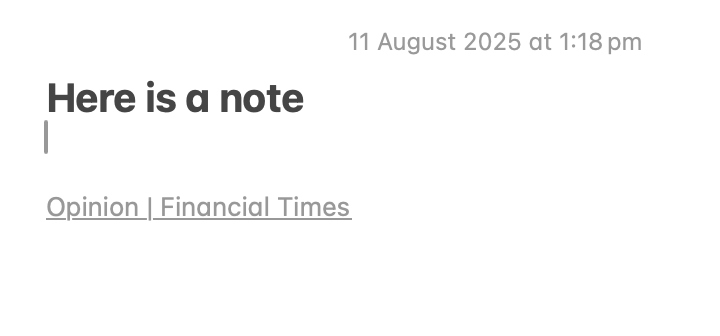
then the macro fills the clipboard with pasteboard items of various flavours, including public.rtf, and pastes here into Apple Notes as the lower line below:

If you wanted to copy the URL of that rich text link for pasting into a plain text editor like BBEdit, you would need to:

  • Ctrl-Click the link for an Apple Notes contextual menu
  • Choose Copy Link

If you are seeing something different, then my first guesses would be:

  • That you need to use a more recent version of the Copy as MD Link macro
  • that if you have installed a recent version, then you may not yet have run the included macro: Update map from bundleIDs to KM UUIDs

(Which builds the required table of supported applications, linking bundle UTI names to the UUID of each corresponding macro in your installation).

Not a user beyond a quick play, so do some research of your own, but as I understand it ProNotes sits between you and Notes. It doesn't change the Notes format, merely "translates" the Markdown you type into the appropriate Notes input. So there's no problem with syncing and so on.

However, Markdown support is very limited -- basically, block-level elements. You can't in-line bold with double-asterisk or add a URL using Markdown for example. So it seems I've over-sold it -- sorry about that.


OK thanks very much !

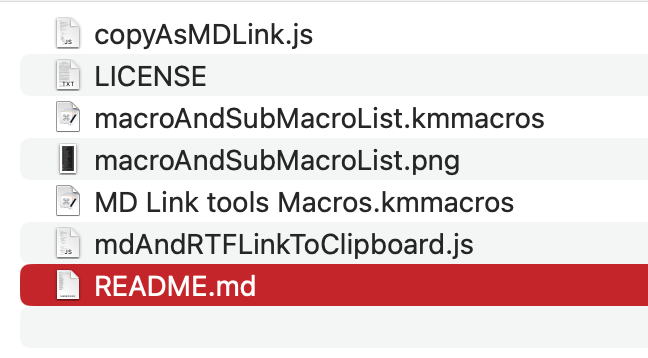
I downloaded the file, but can't find what to click on the install. I looked both in the Github and the KM links. The folder below is in my downloads

Sorry !

image

OK works perfectly in Apple Notes with the new version. Profuse apologies for my irritating post.