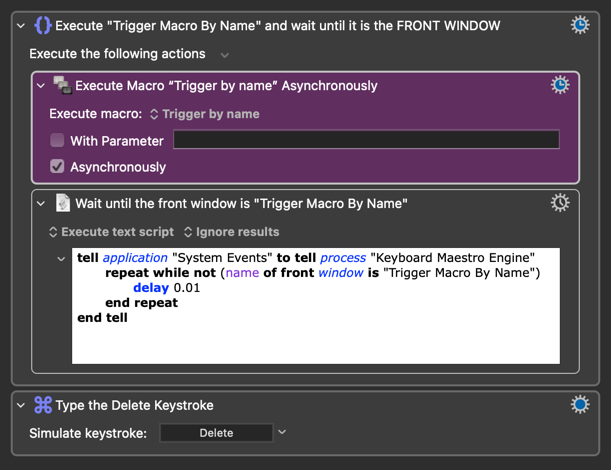
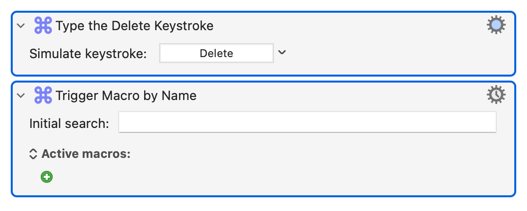
Hi Joel, you could use the “Execute macro” action to trigger your “normal” “Trigger by name” macro ASYNCHRONOUSLY and THEN type the delete/cut key to remove the previous search string.
Since pressing the DELETE key can lead to accidental actions, you MUST implement safeguards. In most cases, an approach like this is sufficient:
@JuanWayri As a start, awesome and much thanks, that works perfectly one.
One follow up as I want to learn and understand what I am doing, what does it mean to run the macro asynchronously (i.e., does it mean / result in the ability to modify the “Trigger by Name” macro because the main / “wrapping” macro has not yet finished hence the DELETE keystroke has an effect)?
Thank you!
[UPDATE: I added the DELETE command to the “else” part of the If statement so that it would work when Keyboard Maestro was closed]
My bad, the previous version didn’t get the correct window name. This version does. I updated so that it uses AppleScript to wait for the Trigger Macro by Name window.
Your original attempts to clear the field failed because when your macro pops the "Trigger Macro by Name" prompt it pauses, waiting for your input. So any action after the prompt, like "Type a Keystroke: Delete", won't happen until after the prompt has gone -- too late!
Macro actions usually happen "synchronously", one after another, during the execution of that instance. That includes the "Execute Macro" action -- the "parent" macro waits for the "child" macro to complete before resuming execution.
So if you have a "parent" macro A that does actions
1
2
Execute Macro *B*
3
4
...and "child" macro B with the actions
x
y
z
...by default the action execution order will be
1
2
Execute Macro *B*
x
y
z
3
4
But "Execute a Macro" (along with some other actions) has the "Asynchronously" option, where the "parent" continues without waiting on the "child". And in that case the action execution order is more like
1
2
Execute Macro *B* (async)
                               x
3
                               y
4
                               z
(That async order does assume that the actions take similar amounts of time to complete -- if x takes a while, an AppleScript for example, 3 and 4 could complete before y happens.)
So in @JuanWayri's example above, the parent doesn't wait for the child "Execute Macro" action to complete and continues on to the "Execute an AppleScript" action. That waits until the "Trigger Macro by Name" pops its prompt, then exits -- after which the Delete keystroke is simulated, clearing the text from the prompt as that is the currently-active UI element accepting keystrokes.
@JuanWayri Apologies but can I ask for one additional modification, that being that pressing the Hot Key Combination a second time clears teh KN search bar as it currently results in an Apple Script Error.
Apologies for asking but it is a bad habit / holdover from Spotlight.
Thank you.
PS. I know this is picky, any way to speed up the "speed of the clear” would be great!
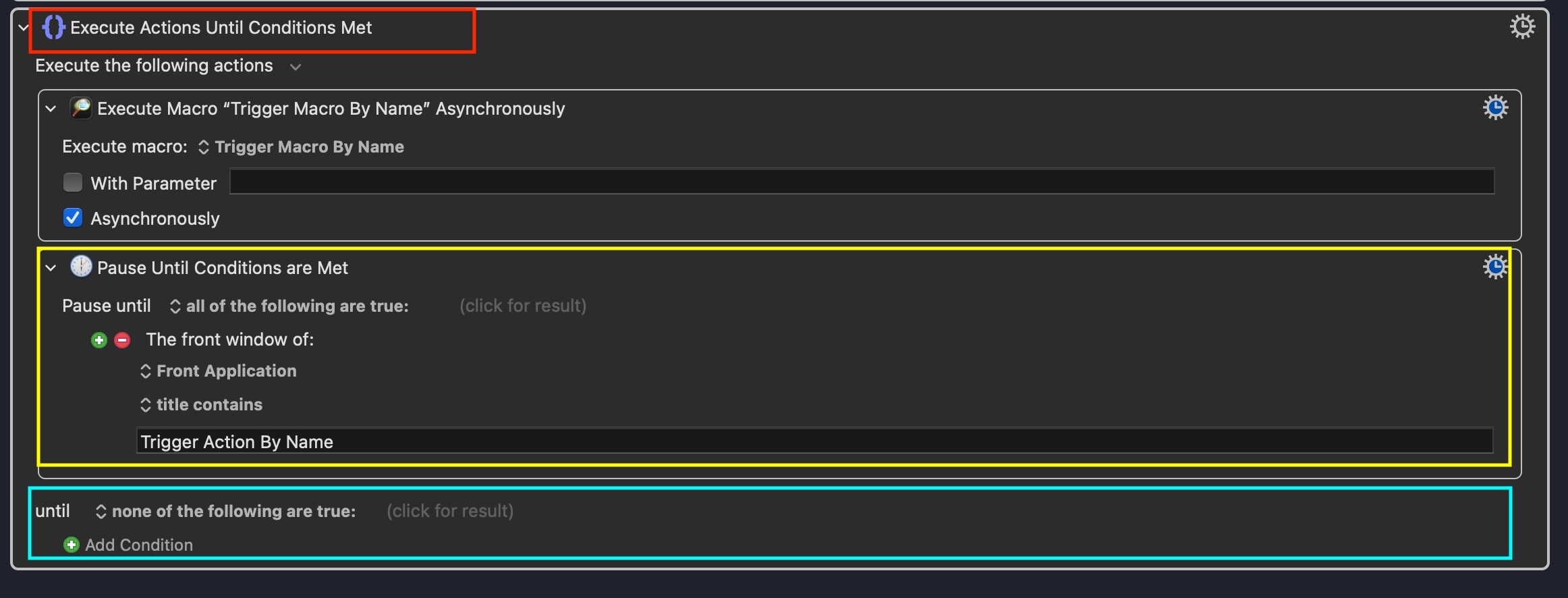
I was studying your macro (in the image in your above post) and came up with an idea of my own but am having a horrible time getting it work to work (i.e., it fails). I compared my macro to your macro and was hoping you (or anyone else in the know) could answer a few related questions based on the below idea and image:
Red Box: I noticed in your above image it reads “Execute Trigger Macro By Name and wait until it is the FRONT WINDOW” which appears to bind / group the two actions whereas mine just reads “Execute Actions Until Condition Met” (i.e., the “and wait until..,” is missing). How / why does mine not contain the “and wait until…” portion and how do I get it to do so? Is this why my macro does not work?
Yellow Box: Is this action a possible replacement for your AppleScript as it appears easier to understand and more intuitive to me. And, if not, then why not? And, if yes, what would the macro look like as mine does not work?
Green Box: I noticed that your above image does not include this bit while mine does. How / why does your’s not include this while mine does? Is this why my macro does not work?
Other: What do I need to change / do to get my version to work as it is more intuitive to me.
@JuanWayri enclosed the "Execute Macro..." and "Execute AppleScript" Actions in a Group Action (the {} label in the name shows that), then renamed the Group to show what it did.
Renaming can be very useful as self-documentation -- but can make it very difficult to find the "original" Action in KM's Action list!
"Execute Until" is for when you want to repeat one or more Actions until a condition is (or isn't) true -- think "keep rolling a dice until I roll a 6". It's the same as "Execute While" except that the Action(s) in an "Until" will always execute at least once.
No -- the KM Engine "owns" the prompt dialog (window) and since it's a background process it will never be the "front application". If you were working in TextEdit and ran the macro, the front window of the front app would remain your currently-active TextEdit document.
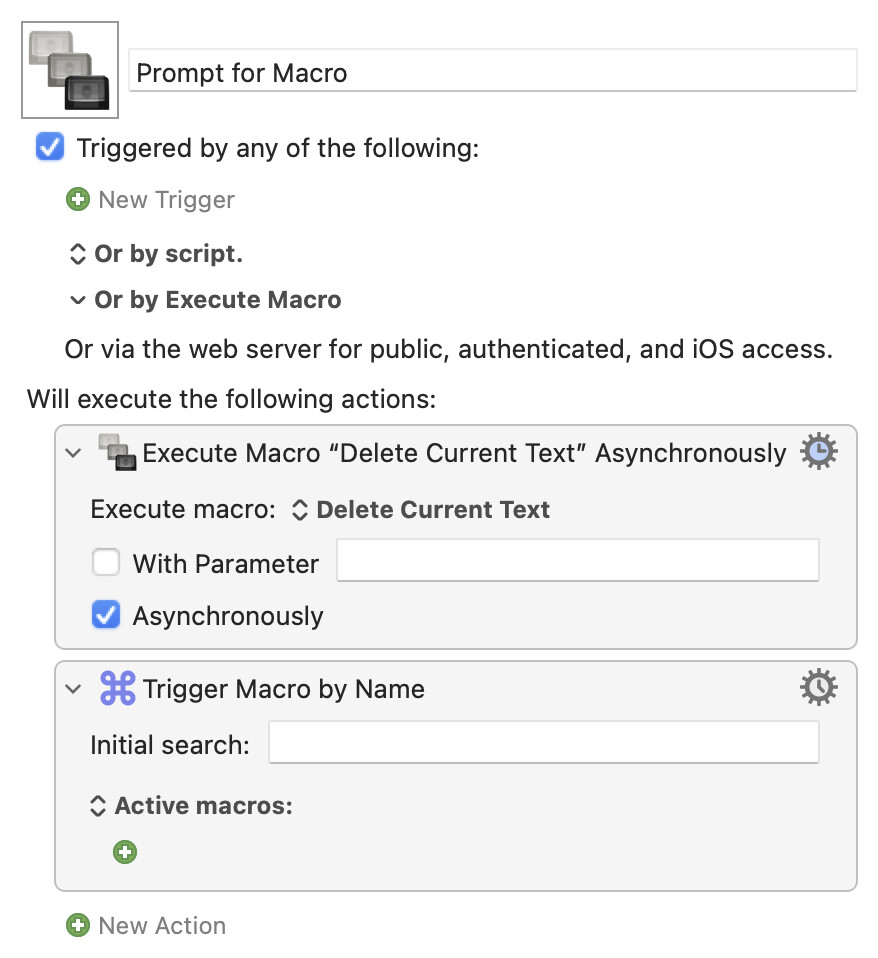
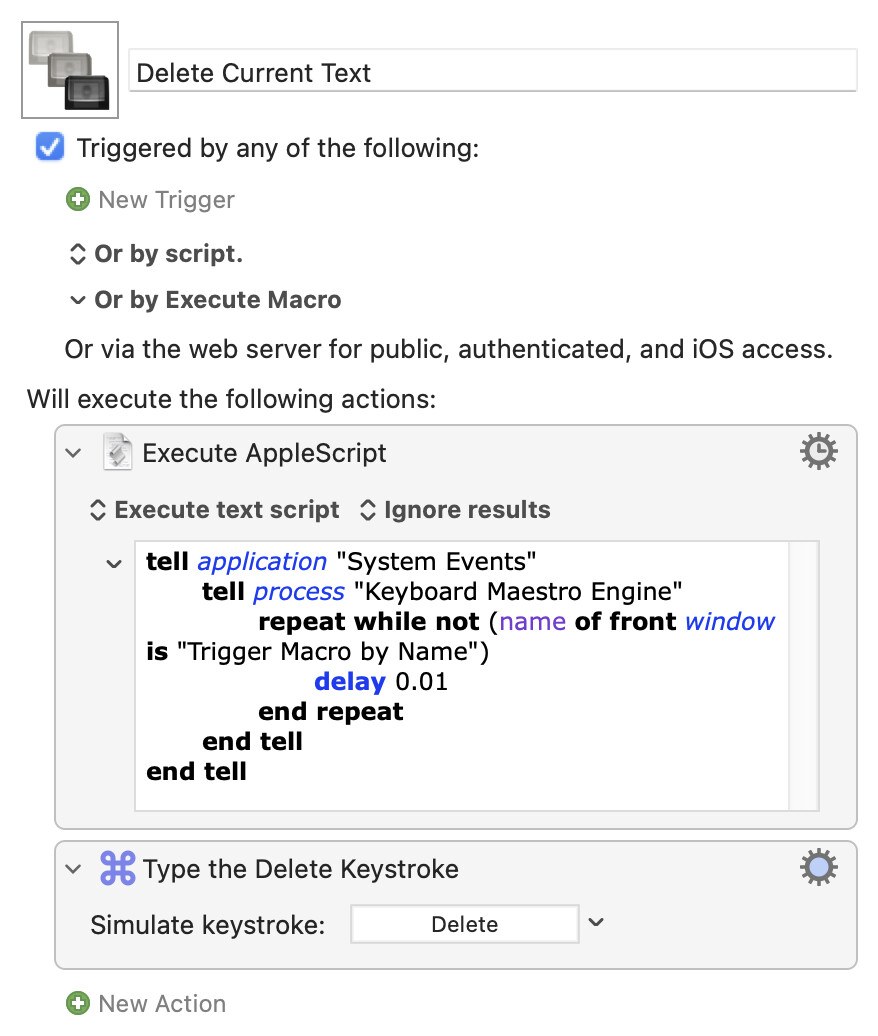
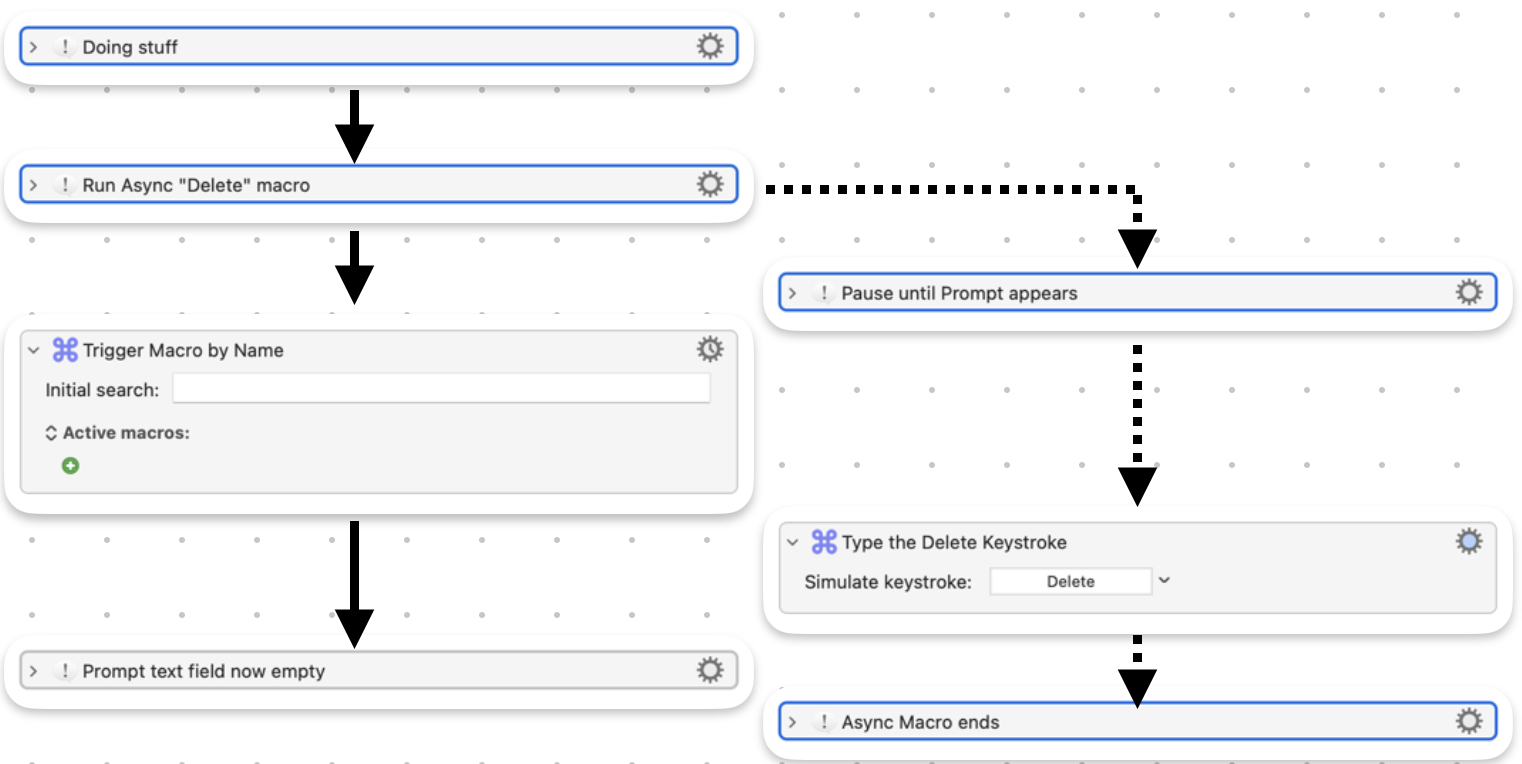
If you find @JuanWayri's version doesn't fit your mental model, maybe the opposite does -- spawning an asynchronous "Deletion" macro. This method is used with other prompts, where you want to get the result of the prompt back into your "main" macro:
@JuanWayri enclosed the "Execute Macro..." and "Execute AppleScript" Actions in a Group Action (the {} label in the name shows that), then renamed the Group to show what it did.
Ahhh, got it. I missed this as it is my third day with KM. I should have poked around more. Sorry!
Renaming can be very useful as self-documentation -- but can make it very difficult to find the "original" Action in KM's Action list!
Ahhh, understood. I have been using Comment as i) actions so that the actions stay “pure” and ii) there is more space to write. I never thought of @JuanWayri ‘s approach. Kudos for something different!
No -- the KM Engine "owns" the prompt dialog (window) and since it's a background process it will never be the "front application". If you were working in TextEdit and ran the macro, the front window of the front app would remain your currently-active TextEdit document.
Details matter. Front application versus front window. Go it!
So it would work were there the ability / option to specify the front window (as opposed to the front application)?
If you find @JuanWayri's version doesn't fit your mental model, maybe the opposite does -- spawning an asynchronous "Deletion" macro. This method is used with other prompts, where you want to get the result of the prompt back into your "main" macro:
Appreciate the opposite approach. I have to wrap my head around asynchronous operations a bit more but get the idea (I think):
– Run process A (i.e., KM search bar) and process B (send delete keystrokes to the KM search bar) with KM being told to delay the timing of process B until the KM search bar is the front window (and thus ready to receive keystrokes) so that the delete keystrokes is sent to the KM search bar.
– Synchronous operation of process A and process B may / will fail because the delete keystrokes may / may not be sent to KM search bar depending on when KM search bar is the front window. The part I am fuzzy about is why the KM search bar would not be the front window (i.e., is it because there is not enough time between drawing the KM search bar and system events registering it as the front window and, if this is correct, why is there not enough time)?
Not in this case. KM's Actions generally work with "foreground" apps (like KM Editor) and not "background" processes (like KM Engine) -- that's why we reach for AppleScript and System Events, which can "target" background processes.
Nonononono...
It will fail because a macro's next Action is only executed after the preceding Action has completed (unless you spawn an asynchronous process/macro that can then run in parallel).
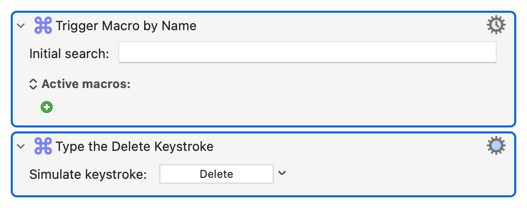
Here's one synchronous method that will obviously fail:
In this case the "Trigger Macro..." Action is not completed -- and the macro doesn't proceed -- until you've used the prompt to select a macro. So the Delete keystroke isn't sent until after the prompt has gone.
Using either of the async methods you (briefly) run two macros in parallel. Crappy picture time!
The AppleScript in this macro waits until the Trigger Macro By Name search bar is frontmost before sending the Delete command to clear it. I recently investigated whether this could be replaced with native Keyboard Maestro window conditions — specifically a Pause Until using either the Front Window or Any Window condition targeting com.stairways.keyboardmaestro.engine.
Result: both conditions fail in normal use. However, I noticed they work when the Keyboard Maestro Editor is frontmost.
My working hypothesis: Keyboard Maestro's native condition checker uses macOS accessibility APIs to inspect process windows. When the Editor is frontmost, macOS appears to extend accessibility trust to the Keyboard Maestro Engine as part of the same process family. When the Editor nor any other Keyboard Maestro application is frontmost, that trust is not active, and the Engine's windows are opaque to Keyboard Maestro's own condition checker — even though System Events (via AppleScript) can inspect them regardless of frontmost state.
This seems to be a macOS architectural constraint rather than a Keyboard Maestro limitation — System Events operates at the OS level with broader access than any third-party application's internal condition checker.
Conclusion for this macro: the AppleScript via System Events appears to be the only reliable solution. The search for a native Keyboard Maestro replacement should stop.
Can anyone confirm, correct, or shed more light on the exact mechanism? In particular I'm curious whether @peternlewis or anyonecan confirm how Keyboard Maestro's window conditions access process information and why background process inspection is frontmost-dependent.
It can -- the trick is in targeting the Engine, which isn't normally listed. I showed you in another thread how to make alias to the Engine so you can select it from KM's "choose an application" list.
Once that's done, an async macro (executed immediately before you throw the dialog) containing:
...should do the job. What you can't do (at least, I can't get it to work) is name-match, so you might have problems if you already have an Engine window open.
Agreed and used. I tried targeting the Keyboard Maestro Engine in the Pause Untils that I created, all of which failed.
Appreciated but I want to make sure I understand. The suggestion is:
Create a separate macro which contains the two above actions. Call this Macro A.
In my above macro:
a) Step 1 becomes calling Macro A Asynchronously.
b) Step 2 becomes calling the macro which spawns the Trigger Macro By Name search bar.
Is that correct?
Agreed, all of teh name matching I tried failed unless Keyboard Maestro Editor was frontmost, which I still do not understand why.
If you're talking about your macro, you should know. If you're talking about my screenshot there's no Group there, just two Actions selected and right-click "Copy as Image"ed.
Because you've used "contains" for the window title match, you should use "matches" so that .* is a regex for "contains 0 or more characters -- effectively, any Engine window. So it works the same as the more usual if WINDOWCOUNT() > 0.