This macro was formerly named: Augment or Filter Text.
If you have a version prior to Version 7.0, you will likely want to disable it before using this version.
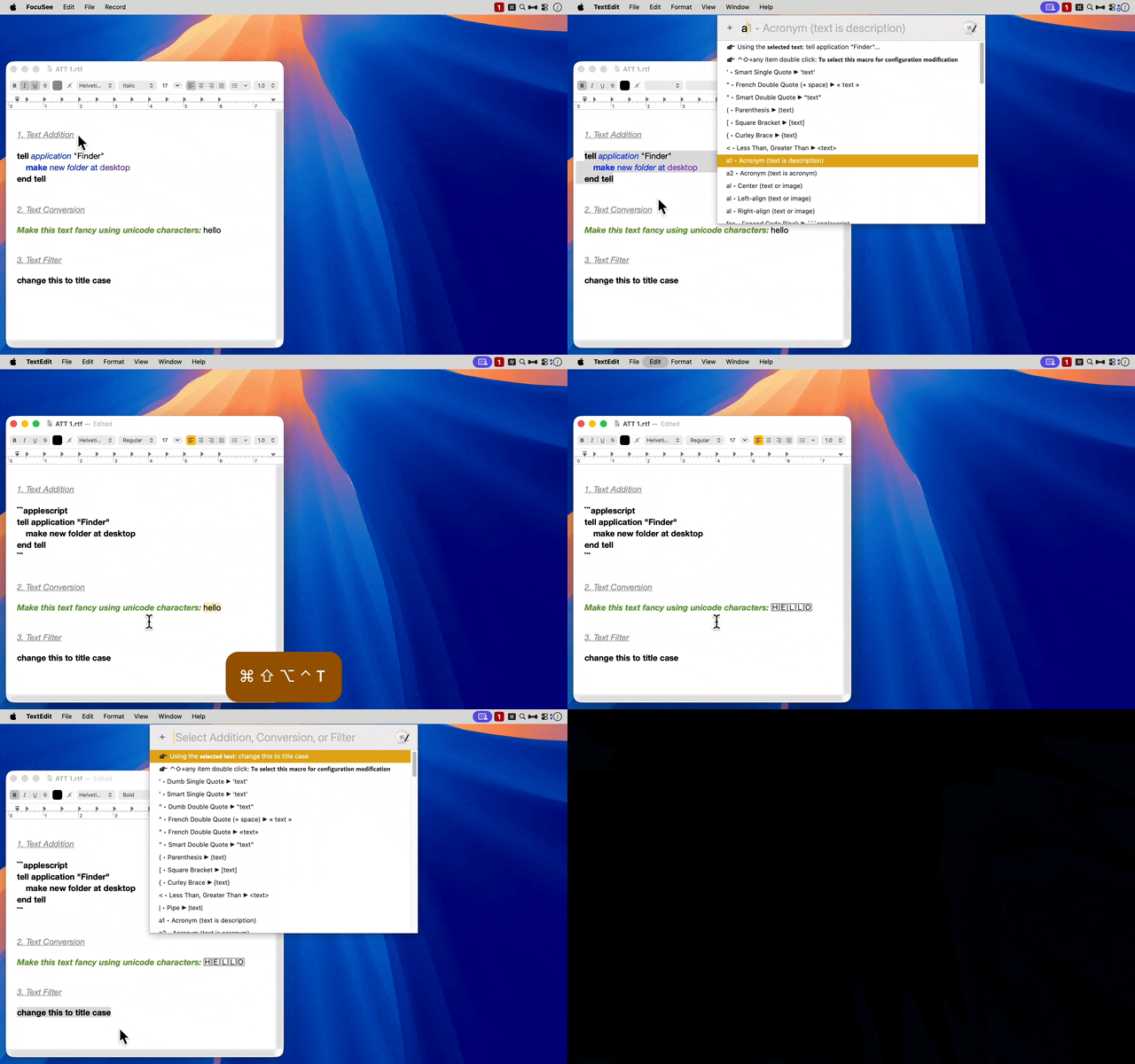
Examples: Selecting from the Menu
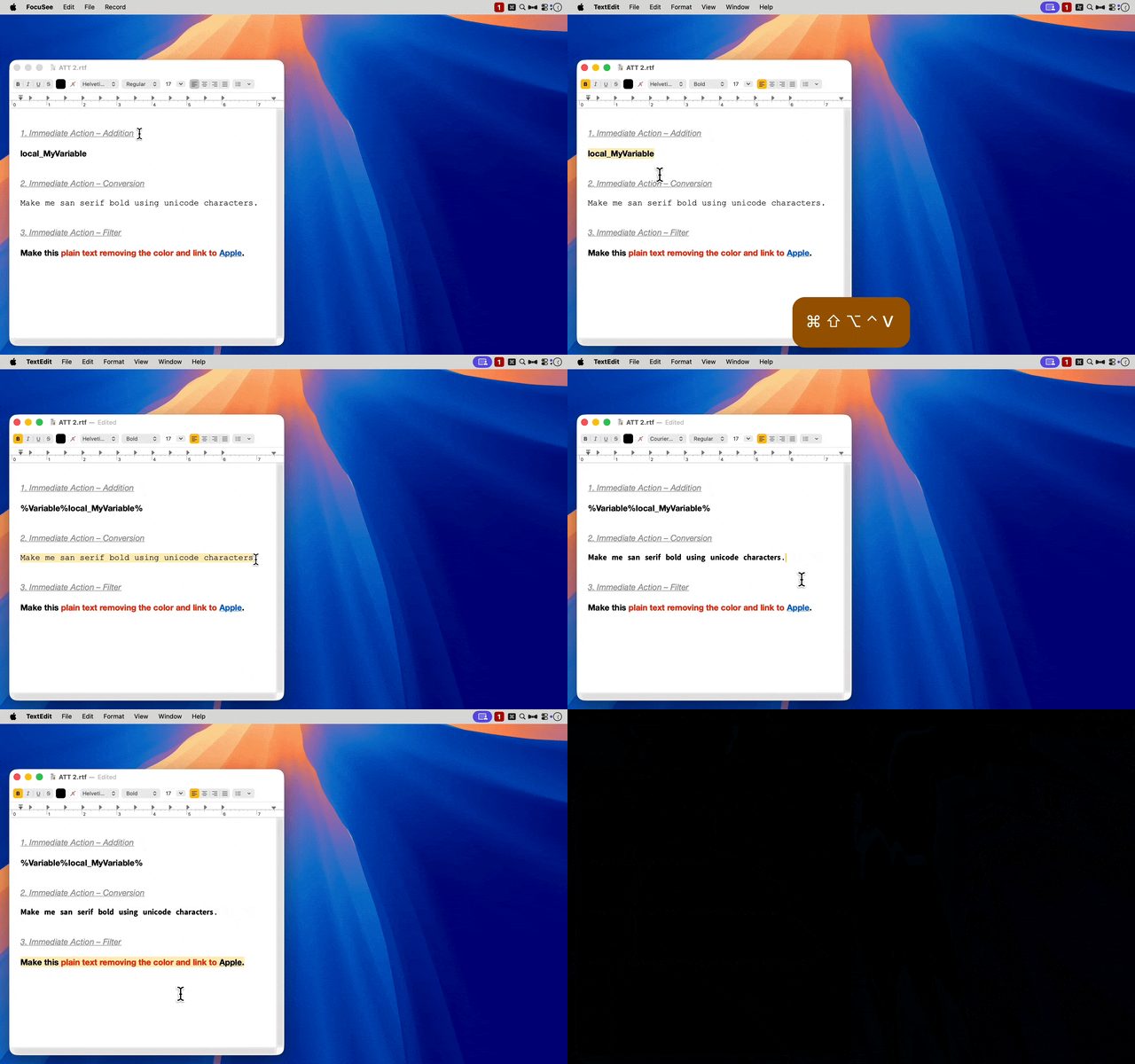
Examples: Using Immediate Actions
PURPOSE
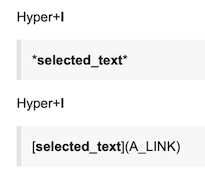
This macro is used to modify the selected text or, if no text is selected, the clipboard text. The text can be augmented or transformed in over ninety ways. Here are four simple examples:
The macro has been designed to provide Immediate Actions (via dedicated hot keys) for those used frequently; whereas selection from a list for those used less often.
By default, this macro is triggered using a hyper key (⌃⌥⇧⌘), plus letter T for general use. When this hot key is pressed a Prompt With List of Additions, Conversions, and Filters will appear. If one of the list options is selected, the choice will be applied to the text.
Due to the efficiency of the Keyboards Maestro Prompt With List action, any of the above Additions, Conversions, or Filters can be applied to the selected text (or clipboard text) with just a few keystrokes. However, for those that are applied frequently, there is an even faster option: direct actions applied using a designated hot key. These are referred to as Immediate Actions.
By default, ten additional hot keys are set for ten corresponding Immediate Actions.
Hyper+b (Markdown Bold)
Hyper+i (Markdown Italic)
Hyper+l (Markdown Link)
Hyper+v (KM Variable)
Hyper+w (KM Variable with a Format–good for single line values)
Hyper+x (KM Variable with a Format–good for multi line values)
Hyper+f (Discourse Folding Section)
Hyper+s (Unicode Sans Serif Bold)
Hyper+p (Plain Text)
Hyper+d (Dumb Single and Double Quotes)
If any of the above Immediate Actions are not needed, the hot keys can be removed from this macro.
REVIEWING CONFIGURATION
The configuration of this macro can be reviewed by triggering it from the Keyboard Maestro editor. For example, here's the default configuration:
( expand / collapse )
addition●⎹●''' • Dumb Single Quote  'text'
addition●⎹●‘’' • Smart Single Quote ‘text’
addition●⎹●""" • Dumb Double Quote "text"
addition●⎹●« »" • French Double Quote (+ space) « text »
addition●⎹●«»" • French Double Quote «text»
addition●⎹●“”" • Smart Double Quote “text”
addition●⎹●()( • Parenthesis (text)
addition●⎹●[][ • Square Bracket [text]
addition●⎹●{}{ • Curley Brace {text}
addition●⎹●<>< • Less Than, Greater Than
addition●⎹●||__| • Pipe |text|
addition●⎹●THE_ACRONYM__a1 • Acronym (text is description)
addition●⎹●__a2 • Acronym (text is acronym)
addition●⎹●
[/details]__f • Folding Section «F»
addition●⎹●applescript <text> __fca • Fenced Code Block applescript addition●⎹●awk
__fca • Fenced Code Block ▶ awk
addition●⎹●bash <text> __fcb • Fenced Code Block bash addition●⎹●diff
__fcd • Fenced Code Block ▶ diff
addition●⎹●http <text> __fch • Fenced Code Block html addition●⎹●javascript
__fcj • Fenced Code Block ▶ javascript
addition●⎹●json <text> __fcj • Fenced Code Block json addition●⎹●markdown
__fcm • Fenced Code Block ▶ markdown
addition●⎹●objectivec <text> __fco • Fenced Code Block objectivec addition●⎹●perl
__fcp • Fenced Code Block ▶ perl
addition●⎹●python <text> __fcp • Fenced Code Block python addition●⎹●plaintext
__fcp• Fenced Code Block ▶ plaintext
addition●⎹●ruby <text> __fcr • Fenced Code Block ruby addition●⎹●xml
__fcx • Fenced Code Block ▶ xml
addition●⎹●__g • Green background; underline text text
addition●⎹●# __h1 • Heading 1 # text
addition●⎹●## __h2 • Heading 2 ## text
addition●⎹●---
---__h2 • Horizontal Rule Before and After text
text
addition●⎹●### __h3 • Heading 3 ### text
addition●⎹●#### __h4 • Heading 4 #### text
addition●⎹●##### __h5 • Heading 5 ##### text
addition●⎹●###### __h6 • Heading 6 ###### text
addition●⎹●
---__ha • Horizontal Rule After text text
addition●⎹●---
__hb • Horizontal Rule Before ---
text
addition●⎹●I:__i • Italics text «I»
addition●⎹●__k • Keystroke text
addition●⎹●L:__l1 • Link text «L»
addition●⎹●SOME_TITLE__l2 • Link 𝘵𝘪𝘵𝘭𝘦
addition●⎹●__p1 • Image
addition●⎹●__p2 • Image
!(text is url)
addition●⎹●[quote]
[/quote]__q • BBCode (Bulletin Board Code) [quote]
text
[/quote]
addition●⎹●[quote=“forum_username_without_leading_@, post:post_number, topic:topic_number”]
[/quote]__q • Discourse Quote
addition●⎹●>> __q • Nested (Second-level) Blockquote >> text
addition●⎹●> __q • Single-level Blockquote > text
addition●⎹●__r • Red background; w/ strikethrough text text
addition●⎹●__s • Strikethrough text
addition●⎹●__sz • Big text
addition●⎹●__sz • Small text
addition●⎹●__sz • Subscript text
addition●⎹●__sz • Superscript text
addition●⎹●W: [%Variable%%]__v • KM Variable (w/ Label) text [%Variable%text%] «W»
addition●⎹●X:
┈ ┈ ┈ ┈ ┈ ┈ ┈ ┈ ┈ ┈ ┈ ┈ ┈
%Variable%%__v • KM Variable (w/ Label) text
┈ ┈ ┈
%Variable%text% «X»
addition●⎹●V:%Variable%%__v • KM Variable %Variable%text% «V»
addition●⎹●y • Yellow background text
conversion●⎹●Circled Latin (unicode) ⓉⒺⓍⓉcl • Circled Latin (unicode) ⓉⒺⓍⓉ
conversion●⎹●Double-Struck (unicode) 𝕥𝕖𝕩𝕥__ds • Double-Struck (unicode) 𝕥𝕖𝕩𝕥
conversion●⎹●Fullwidth (unicode) text__fw • Fullwidth (unicode) text
conversion●⎹●Monospace (unicode) 𝚝𝚎𝚡𝚝__m • Monospace (unicode) 𝚝𝚎𝚡𝚝
conversion●⎹●Negative Circled (unicode) 🅣🅔🅧🅣 nc • Negative Circled (unicode) 🅣🅔🅧🅣
conversion●⎹●Negative Squared (unicode) 🆃🅴🆇🆃 ns • Negative Squared (unicode) 🆃🅴🆇🆃
conversion●⎹●Serif Bold (unicode) 𝐭𝐞𝐱𝐭__sb • Serif Bold (unicode) 𝐭𝐞𝐱𝐭
conversion●⎹●Squared Latin (unicode) 🅃🄴🅇🅃sl • Squared Latin (unicode) 🅃🄴🅇🅃
conversion●⎹●Sans Serif (unicode) 𝗍𝖾𝗑𝗍__ss • Sans Serif (unicode) 𝗍𝖾𝗑𝗍
conversion●⎹●S:Sans Serif Bold (unicode) 𝘁𝗲𝘅𝘁__ssb • Sans Serif Bold (unicode) 𝘁𝗲𝘅𝘁 «S»
conversion●⎹●Sans Serif Bold Italic (unicode) 𝙩𝙚𝙭𝙩__ssbi • Sans Serif Bold Italic (unicode) 𝙩𝙚𝙭𝙩
conversion●⎹●Sans Serif Italic (unicode) 𝘵𝘦𝘹𝘵__ssi • Sans Serif Italic (unicode) 𝘵𝘦𝘹𝘵
filter●⎹●Convert Single Quotes to Dumb Single Quotes' • Convert Single Quotes to Dumb Single Quotes
filter●⎹●D:Convert All Quotes (Single and Double) to Dumb Quotes'" • Convert All Quotes (Single and Double) to Dumb Quotes «D»
filter●⎹●Convert Double Quotes to Dumb Quotes" • Convert Double Quotes to Dumb Quotes
filter●⎹●Convert Double Quotes to French Quotes" • Convert Double Quotes to French Quotes
filter●⎹●Convert Double Quotes to Smart Quotes" • Convert Double Quotes to Smart Quotes
filter●⎹●Capitalize Every Word__cw • Capitalize Every Word
filter●⎹●Decode HTML Entities__d • Decode HTML Entities
filter●⎹●Encode HTLM Entities__eh • Encode HTLM Entities
filter●⎹●Encode Non-ASCII HTML Entities__en • Encode Non-ASCII HTML Entities
filter●⎹●HTML List__h • HTML List
filter●⎹●KM Forum User URL to @User__km • KM Forum User URL to @User
filter●⎹●lowercase__lc • lowercase
filter●⎹●lOWERCASE FIRST LETTER__lf • lOWERCASE FIRST LETTER
filter●⎹●Percent Decode URL__pd • Percent Decode URL
filter●⎹●Percent Encode for URL__pe • Percent Encode for URL
filter●⎹●P:Plain Text__pt • Plain Text «P»
filter●⎹●Process Keyboard Maestro Tokens__pt • Process Keyboard Maestro Tokens
filter●⎹●Reddit User URL to Reddit User__ru • Reddit User URL to Reddit User
filter●⎹●Title Case__tc • Title Case
filter●⎹●Uppercase first letter__uf • Uppercase first letter
filter●⎹●UPPERCASE__up • UPPERCASE
filter●⎹● to URL__ur • to URL
filter●⎹●Minimize Discourse URL (example, reduce to: https://example.com/t/27033/128)__ur • Minimize Discourse URL (example, reduce to: https://example.com/t/27033/128)
The list can be limited to the Immediate Actions by holding down ⌘ when the macro is run from the editor. For example, here are the default Immediate Actions:
( expand / collapse )
B addition●⎹●B:b • Bold text «B»
D filter●⎹●D:Convert All Quotes (Single and Double) to Dumb Quotes'" • Convert All Quotes (Single and Double) to Dumb Quotes «D»
F addition●⎹●F:[details=( expand / collapse )]
[/details]__f • Folding Section «F»
I addition●⎹●I:__i • Italics text «I»
L addition●⎹●L:__l1 • Link text «L»
P filter●⎹●P:Plain Text__pt • Plain Text «P»
S conversion●⎹●S:Sans Serif Bold (unicode) 𝘁𝗲𝘅𝘁__ssb • Sans Serif Bold (unicode) 𝘁𝗲𝘅𝘁 «S»
V addition●⎹●V:%Variable%%__v • KM Variable %Variable%text% «V»
W addition●⎹●W: [%Variable%%]__v • KM Variable (w/ Label) text [%Variable%text%] «W»
X addition●⎹●X:
┈ ┈ ┈ ┈ ┈ ┈ ┈ ┈ ┈ ┈ ┈ ┈ ┈
%Variable%%__v • KM Variable (w/ Label) text
┈ ┈ ┈
%Variable%text% «X»
SETTINGS
Refer to the comments above the three text variables local_Additions, local_Conversions, and local_Filters.
local_SortCategories 0|1, default 1. If set, additions, conversions, and filters are still grouped, but within each group, all items are sorted. Otherwise, the items within each category will be displayed in the order they are configured.
TESTED WITH
• Keyboard Maestro 11.1.1
• Tahoe 26.6.2 (25G83)/MacBookPro18,2
VERSION HISTORY
( expand / collapse )
1.0 - Initial version
2.0
In the Filters section, added:
• Smart Smart Single Quotes to Dumb Single Quotes
• Reddit User Link to Reddit User
• Quoted URL to URL
The three additions to the Filter section employ regular expressions since the Keyboard Maestro Filter action does not provide these options.
2.1 - Bug fix. Delete Past Clipboard 0 should only be executed when %SystemClipboard% <> %Variable%local_SysCb%
2.2
a) Added to local_Additions corresponding to the following hot keys: Hyper+w, x, m, and f.
b) Improved this header comment.
2.3 - No change to macro functionality. Improved this header comment.
2.4 - Changed the two Prompt With List actions to Automatic Width.
2.5
a) Removed superfluous colon ( : ) from Hyper+w.
b) Corrected typographical errors in the header comment.
c) Updated TESTED WITH information.
3.0
a) Simplified the format of local_Filters.
b) Added a Filter: KM Forum User URL to @User (example conversion: Profile - _jims - Keyboard Maestro Discourse to @_jims.
3.1
a) Added a Filter: Plain Text
b) For KM Forum User URL to @User generalized the regex search to enable more conversions (e.g., Markdown links: @_jims ).
c) For Convert Double Quotes to Dumb Quotes changed from the Filter action to the Search and Replace action because there may be times when the smart quotes do not match.
d) Corrected a typo in this comment and deleted a n/a note in the comment below: Syntax Description: SETTINGS (Additions)
4.0
a) Added Titles to the two Prompt With List actions.
b) Added an option to return the the Additions from the Filters Prompt With List.
c) Added an Addition: Quote Block
d) Modified the following Additions: Folding Section (added a horizontal rule below the text), the three KM Variables (improved the PWL labels), and KM Macro Download Annotation (improved the download annotation)
e) Improved the RegEx pattern that searches the Additions (that potentially include an Immediate Action hot key). The previous version did not function as expected for the modified Folding Section and the added Quote Block. Added a comment above the RegEx pattern to explain each RegEx element.
f) Updated the TESTED WITH section.
5.0
a) Renamed ‘Code Block’ to ‘Fenced Code Block’; added Fenced Code awk, bash, diff, html, objectivec, perl, python, ruby, xml. Also added ‘Fenced Code Syntax’.
b) Improved the descriptions for local_Additions: <mark>, <ins>, and <del>.
c) Updated the TESTED WITH.
6.0
a) Changed the macro name from Augment or Filter Text to Augment or Transform Text.
b) Transformations include the Filters and a new set: Conversions
c) The Conversions include eight conversions to unicode characters. This is done with a JXA function.
d) All actions (Additions, Conversions, and Filters) appear in a single Prompt With List.
e) Immediate Actions are no longer restricted to Additions.
f) Added three default Immediate Actions. See Hyper+s (plain text to Sans Serif Bold), Hyper+p (rich text to plain text) , and Hyper+d (all smart to dumb quotes).
g) Immediate Actions are denoted at the end of the Prompt With List items. For example, for <hk>s:ssb • Sans Serif Bold, the PWL item is: ssb • Sans Serif Bold〈 s 〉
h) Added <div align="center"></div> to the Additions; added '" • Convert All Quotes (Single and Double) to Dumb Quotes to the Filters.
i) Eliminated the notification if no text is selected and the Clipboard is being used.
j) Improved the comments throughout.
7.0
a) Added a Prompt With List option to modify the macro. This makes it easier to modify the configuration.
b) Added a Prompt With List header line that displays the first 80 characters of the selected text (or if it being used, the Clipboard).
c) Displays an error if an Immediate Action hot key in repeated in the configuration.
d) Displays a dialog if no text is selected and if the Clipboard does not include text.
e) Modified the logic to significantly improve performance.
8.0
a) In local_Additions added Big, Small, Superscript, Subscript, Acronym, Heading 1 to Heading 6.
b) * A Hyper+l (i.e., ⌃⌥⇧⌘+l) Immediate Action trigger was configured and intended for Link [text](𝘜𝘙𝘓), but there was a configuration error in local_Additions: the <hk>l: prefix was missing. It has been corrected and is now: <hk>l:[<text>](A_URL)__l1 • Link [text](𝘜𝘙𝘓)
c) Uses the Copy action and the %ActionResult% token rather than the CLIPBOARDSEED() function. A 0.5 second Pause is no longer required due to the new approach.
d) If no text is selected and the Copy action (or Type a Keystroke [⌘C] action) runs, macOS generates a pop sound (at low volume).
e) From the Prompt With List, Configuration Modification is now done using ⌃⇧+any item double click. Previously ⌃⇧Return was another option. This change was necessitated by macOS Sequoia that uses the Keyboard Shortcut ⌃Return to display contextual menus (and unfortunately ⌃⇧Return does the same). For more information, see 50 New macOS Sequoia Features and Changes Worth Checking Out - MacRumors (#46).
9.0
Added Minimize Discourse URL to the Filter group:
With this filter, if a URL like the following is selected (or in the clipboard, if no text is selected):
https://forum.keyboardmaestro.com/t/macros-desktop-spaces-macros-to-improve-navigation-and-window-management-v5-0/27033/128?u=_jims
it will be minimized and pasted as follows:
https://forum.keyboardmaestro.com/t/27033/128
10.0
a) Now uses %ExecutingThisMacroUUID% token to set local_MyUUID
b) Bug fix: The setting <div align="center">\\n\\n<text>\\n\\n</div>__c • (center item) mistakenly included a smart quote rather than two straight quotes.
11.0
a) Performance improved, i.e., the following occur more quickly: 1) the initial menu rendering, 2) Immediate Actions recognition, 3) final augmentation or transformation
b) New setting: local_SortCategories 0|1, default 1. If set, additions, conversions, and filters are still grouped, but within each group, all items are sorted. Otherwise, the items within each category will be displayed in the order they are configured.
c) New Additions: Single-level Blockquote, Nested (Second-level) Blockquote, Align Left, Align Right
d) New Conversions: Serif Bold, Fullwidth, Monospace, Double-Struck
e) Returns an error if an Immediate Action hotkey is found on more than one entry
f) local_Debug is set to Dump_PwlLines if the macro is started from the Keyboard Maestro editor. If ⌘ is pressed at the time it is triggered, it is set to Dump_PwlLinesWithHotKey.
Download: Augment or Transform Text.kmmacros (179 KB)

Macro-Notes
- Macros are always disabled when imported into the Keyboard Maestro Editor.
- The user must ensure the macro is enabled.
- The user must also ensure the macro's parent macro-group is enabled.
System Information
- macOS 26.6.2 (25G83)
- Keyboard Maestro v11.1.1