New Forum Feature: Question "Solved" (or "Best Answer")

###New Forum Feature: Question "Solved" (or "Best Answer")
In late April 2016 this new feature was released.

It provides a method for the Original Poster (OP) of a topic, which is a question or issue, to select the best reply that resolves the issue, or, IOW, the "best answer" (as used in other forums).

###How To Use

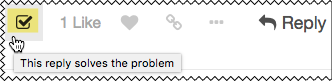
At the bottom of the post that answers or solves the question/problem as you originally stated it, simply click the "Solved" checkbox:
####The benefits of this feature are:

  1. When a future reader of the original post views the question/issue, they can immediately see that it has been answered/resolved.
  2. When viewing the forum topic list, the viewer can quickly see which topics have been answered/resolved.

Here is an example of how this works.

See this topic on the Discourse forum.

1. User posts new topic

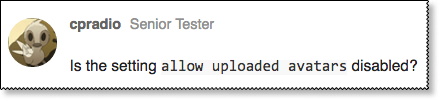
2. Another user provides the answer
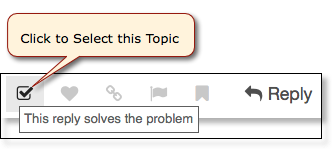
3. OP Selects that post as "best answer"

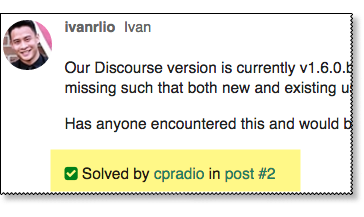
4. Original Post is Updated to show selected answer:
1 Like
Extracting Data From Microsoft Excel
Display List of All Files Selected in Path Finder
Numbering Files Added to Folders
Duplicate Macro for Trying Changes
How to get a Macro Palette NOT to float
[Feature Request] Go to Macro in Execute a Macro
How Do I Get and Set KM Variables in Browser JavaScript?
Select Link in Safari?
Time zone conversion?
How Do I Get All Lines in a String that end With the same SubString? (RegEx, grep)
Triggers have stopped working
[MULTIPLE] Click Google Chrome Link
Select Item in Drop Down Menu in Print Dialog Box
How manually type a date while a macro is runnig and then it copy my input?
Hide/Show File Extension Macro
Inserting text by pasting
Pass Variables to AppleScript
Help: Change the Color of the Selected Object in Preview
Find multiple lines with Search Variable Action
Save application document as same name
One time instead of repeated execution inside 'app trigger'?
Determining if an Open or Save dialog box is open
Help with macro that changes lower case "i" to upper case "I"
How can I use KM to open a safari window in specific position?
How to use variable to paste 4 Clibboards” Macro?
Trackpad click on a certain image as a trigger
Enter Today's Date + a certain number of days
Does the KM license work across multiple computers?
How to complete a File/Save box
If URL is x, show alert y
Typing Numbers on the Number Pad
How to import an icon into icon chooser
Creating 'add file' prompt
Issue with macro names in 8.0.1
Nightmare loop in KM
Activate/Deactivate Macro Group action not working after v8.0 update
Close Tabs to the Left in Safari and Google Chrome
Macros in FileMaker Pro (FMP) don't work after FMP upgrade
How would I calculate the size of a folder (including all contents)?
ScanSnap Receipt
Altering Date Formatting
How Do I Manipulate Windows in AppleScript?
Copy link address (Chrome or Safari) (Newbie alert)
Regex not working
Named clipboard (Variable) as a condition for some other clipboard
Press and hold alt (option) key not working
Find and cut lines from list to new list based on name
Disable Keyboard Maestro macros when certain programs are running
How Can I better Organize, Manage, and Select my Macro Groups?
Change Directory in the Finder
Search Clipboard For Specific Text and Extract To Clipboard
Beginner advice needed - Searching Text with RegEx
Finding the Original Path of Aliases in the Finder Selection
Can I show a palette only when I am on a specific website?
How to find and open an email in Apple Mail with a specific word in the subject line
File Maker Pro Macro won't work after Mac upgrade
“Smart Copy” Macro [SOLVED]
What is causing the unpredictability/unreliability of this macro?
Rather than using mouse-clics I want to 'call' text descriptions in a dropdown window!