Troubleshooting "More than 50 simultaneous macros - aborting everything" error

Hello,

I'm looking for general tips and suggestions for generic troubleshooting steps. I'm having a hell of a time troubleshooting this error:

"More than 50 simultaneous macros - aborting everything"

Any suggestions for how to get to the bottom of this are welcome. If I could just figure out what those 50 macros are, I imagine that would help a lot in troubleshooting this. However, nothing shows up in the log other than the 8 macros that I am intentionally running. Nothing else shows up in the KM menu "cancel" drop down, at least not that I have been able to see.

The log is filled with messages like:

2022-05-06 02:54:46 Running application query took a while (11557 us)
2022-05-06 02:54:47 Running application query took a while (10342 us)
2022-05-06 02:54:47 Running application query took a while (7088 us)
2022-05-06 02:54:48 Running application query took a while (15535 us)
2022-05-06 02:54:48 Running application query took a while (13157 us)

It's my understanding from searching this forum that these log errors and common and not to be concerned about, but given my difficulties perhaps they are relevant to my situation.

Is there a way that the debugger might be able to help in troubleshooting a problem like this? Since each macro seems to work fine, I haven't been able to identify any problems using the debugger, but maybe it has more functionality than I am aware of.

Is there an "advanced logging" feature that might show what actual 50 macros are trying to run or other useful information?

None of my macros trigger themselves based on timers or anything else, they are only started manually with a hot key and run continuously until cancelled.

I use one hot key macro to manually start the 8 macros I am using, and a separate macro hot key that runs the "cancel all macros" command when I want to stop.

My macros are very long and complicated and interact with variables set by each other and I imagine they are more than is reasonable to support here, so I'm particularly interested in learning more troubleshooting steps so that I can improve my skills in continue working through the problems as they come up.

Keyboard Maestro is an invaluable tool and an amazing asset to my workflow, and I imagine I am using it well beyond the intended design so better understanding the tool is very helpful for me.

Thank you!

A general overview of my macro arrangement follows, but can likely be ignored as I am looking more for troubleshooting methodology than specific macro coding.


A general overview of my macro setup:

The 8 macros I am intentionally running are continuous macros that run until cancelled.
They work together as a set, so they are functionally really one purpose (real time monitoring of application states and progress bars in a 25-node 3D rendering farm and sending keystrokes when appropriate).

1 macro monitors pixels on the screen for my actions, progress bars, etc, and sets and adjusts variables accordingly.
1 macro tracks timers based on when functions are used or states are reached and sets variables accordingly.
5 macros are one per application I wish to control. They simply monitor the variables as set by the first two macros, and send the actual keystrokes to the appropriate application as needed.

These macros are used real-time as I am actively working through the day. I am also dynamically changing variables using a floating palette that activates or skips functions in the macros based on my palette selections, just a simple "on/off" state corresponding to If/Then statements in the macro running on a loop. I'm typically working in the front application, with the macros sending keystrokes to the background applications based on my workflow.

I am very commonly stopping and starting my macros based on the workflow needs, so I have one macro that starts the other 7 and one macro that simply stops all macros. These two are used frequently throughout the day.

Every macro has a semaphore lock set on it, with a 1 hundredths second timeout with "abort macro after timeout" - I can't find any macro in my arrangement that should be possible to run more than once, and there are only 8 macros. The "more than 50" error is quite baffling.

My macro that starts my macros also has as it's second command (just after the semaphore lock) "Cancel All other Macros", which shouldn't be needed with the semaphore locks but was added in the hopes it would help with the "more than 50" error - the slate should be wiped clean every time I start the system.

The issue is very intermittent, many times things work as expected, and then sometimes I get the "more than 50" error and things stop, which causes a lot of pain when renders can take many hours.

I cannot reproduce the problem by starting my macros over and over again, the semaphore lock seems to be working in that regard - no matter how many times I try and run a macro, it only seems to run once.

Thank you!
Perhaps this might help you see which macros were running in duplicate?

Also, someone else had a similar issue, so perhaps they might have some insight?

You can use the Macro Debugger to see the macros.

Every macro, and every nested macro counts towards the 50 simultaneous macros.

Generally, you will only hit this case is:

a) You have a macro that is being triggered frequently.
b) You have a macro that is long running, and it is at a higher frequency than its run time.
c) You have a macro that is triggering itself, directly or indirectly, or triggering lots of sub-macros.

The alert is basically a defence mechanism in Keyboard Maestro to stop these kinds of overload cases since they almost invariably indicate that your macro has run off the rails.

Thank you, that sounds promising. Getting a list of what these 50 macros are would be exceptionally helpful, and if the debugger can do that somehow, that would be excellent. So far I have not been able to get that information from the debugger. Here's the steps I'm doing:

  1. Select "Start debugging" from the KM menu
  2. Check the box for "Pause New Macros"
  3. Hit my hotkey to start my macros
  4. Hit the "play" icon (first icon in the row showing the new macro) for each macro.
  5. Macro's run normally, I can see the status of the macros running, etc.
  6. If I hit any hotkeys to start or stop new macros, they show up in the list paused and I manually hit the "play" button again.
  7. I have 8 macros running, all seem to be working normally.
  8. After some amount of time and an unknown reason, the macro list disappears from the debugger. All macros stop. Error log says "more than 50 simultaneous macros". No additional macros appear in the debugger list. "Pause new macros" is still checked, yet somehow we have hit the "more than 50 macros running" error again.

Suggestions? Is there a debugger log or something else that might show more detail? I did a screen recording and stepping through it frame by frame and I couldn't see any extra macros added before the crash, but at 30 frames a second it might not be able to catch it.

Here's my thought on what's happening: When I have the debugger in "pause new macros" mode and I manually start more than 50 macros without letting any of them play, it does cause the same "more than 50 macros" error and everything shuts down, clearing the debugger macro list. So my guess is that when the debugger hits whatever my macro problem is that is somehow starting the new macros, even through the debugger has "pause new macros" enabled those more-than-50 macros are added to the queue - and the queue exceeds 50 macros, and therefore the engine (and debugger macro list) shuts down, unfortunately without giving me any useful information.

Thanks for the help!

Can you define "sub-macros"? I've been thinking of 'sub macros' as actual separate macros called by the main macro. My macros don't (intentionally!) do that, but I do have lots of nested "If" statements.

Is there a limit on the number of nested "If" statements that KM can run that might trigger this error? I definitely imagine there would be situations where the 8 macros I am running all hit a series of nested "if" statements at the same time, exceeding 50 simultaneous operations.

Hi @chanpua
I would guess that despite all your best efforts so far, your collection of Macros are rerunning over each other and building up to more than 50 instances at one time.

It is this bit of that statement that jumps out:

run continuously until cancelled

How is that being achieved as it suggests endless loops?

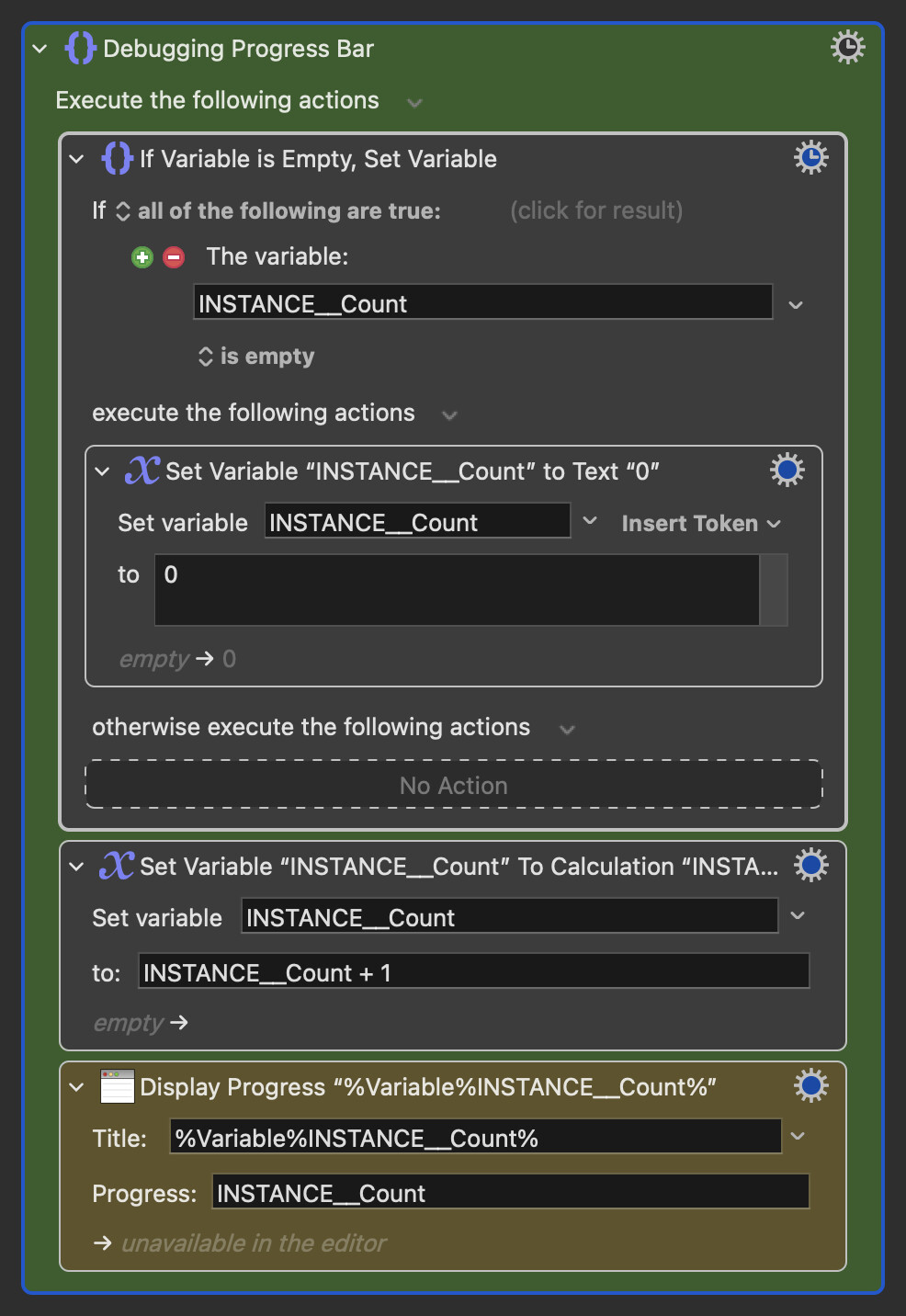
This might or might not be much help. I had a similar issue and it turned out to be a loop I had created using an Execute Macro Action. I was able to troubleshoot by using the new Progress Bar Action. Each time a specific task was completed I put a Progress Bar with an incremental number as its title. Sure enough when the number reached 50 everything stopped. And in this case I had done everything to make sure there wasn't an overlap by adding in Cancel This Macro Actions.

Here is how I set up the Progress Bar Debugging Action:

Debugging Progress Bar.kmactions (2.3 KB)

Click to Show Image of Actions

You have implied that you have no Execute Macro Actions embedded in your Macros but that would still be my first thing to double-check. You can do that by opening up the Macros in the Editor and typing "Execute" into the search field. Expand all the Actions and look for any highlighted Actions.

1 Like

Ok, I have been able to recreate the problem with a simple example macro, which I have attached here. It appears to me that the issue is with the number of statements I am evaluating, the error log "more than 50 simultaneous macros" was a bit of a red herring.

KM is counting a "simultaneous macro" as any command KM is evaluating in a macro, including the "group" action which I commonly use for organizing and documenting my macros. Furthermore, every command and group leading up to that command appears to remain as part of the running macro count if that resulting action has a "pause" in it, at least for the duration of the pause.

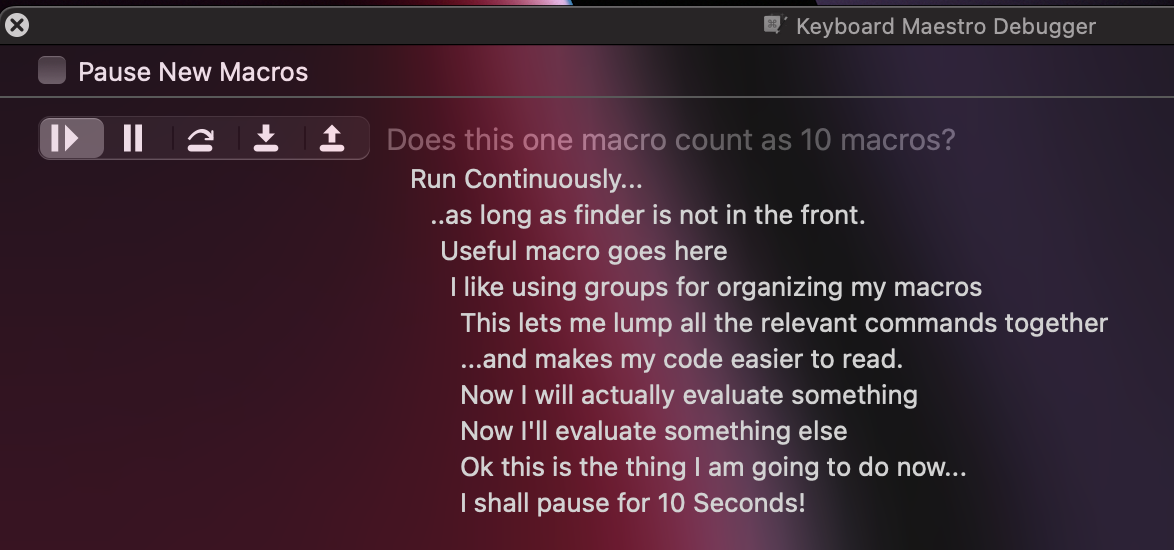
Here's a simple example macro that continuously checks - as long as the finder is not in the front - if a variable is a 1 or a 2, and pauses if it is not. It appears that, when this macro is in the pause state, it counts as 10 running macros in regards to KM's macro limit.

I believe this is what Peter was saying above when he said "every nested macro counts towards the 50 simultaneous macros", I just didn't understand that yet. I haven't been thinking of individual commands in a macro as their own macro, and certainly not groups which I was treating like folders for organizational purposes.

Peter, if you can confirm that I am correct in how KM is counting macros, that would be appreciated.

I can then get started on re-writing my macros to remove the groups, use more switch statements and less IF/Then and otherwise re-write my macros to be more "flat" and fit within the KM limits.

A suggestion would be adjusting the wording of the "more than 50 simultaneous macros" error log message to indicate this applies to the number of commands being evaluated, rather than the number of user-named macros running. Maybe a Wiki entry on how the macro limit works and is calculated?

Thank you! I really appreciate KM for the amazing things it lets me do! Once I understand how this limit works I imagine I can re-work my macros to fit within these limits and continue with the massive productivity boost this software provides.

Does this one macro count as 10 macros?

Could you post the actual macro you're having issues with, so we can see what's going on?

No need to use Dropbox; just drop the macro into the comment box and it will be uploaded directly.

Sidenote: I'd say nesting that many groups makes it harder to read.

The example provided has the same problem. If you run it 5 times, it works - add any macro command after that and the entire system stops, with the error "more than 50 simultaneous macros" in the log file. I believe the issue here is that a "macro" is not a user-named macro instance, but any command executed by KM. If that command happens to be a pause, then everything that led up to the decision to make that command continues to be counted as individual "macro" instances until that pause command is resolved. This makes it very easy to hit the "macro" limit, and the problem can be easily replicated with my example.

Pending confirmation from Peter, my current understanding is that this is a limit of KM in the current implementation, so unless something changes with how KM counts a "macro" then the solution for me is to flatten my macros to avoid as many nested commands as possible and stop using groups so frequently.

1 Like

Having tried it, I'll go one further -- if you delete the last nested group so there's only 9, then run it 5 times, you can load up another 5 "single" macros OK, but the 6th kills everything. 9*5+6=51, so it looks like you're right.

And I don't think the pause is a contributing factor -- if I delete it, I still see the same behaviour..

1 Like

Yes, nested lists each count.

If that is your only issue, then feel free to increase the 50 to 200 by adjusting the settings:

defaults write com.stairways.keyboardmaestro.engine MaximumSimultaneousMacros -int 200

Keyboard Maestro has no specific hard limit for this - it is just highly unusual to have such deep nesting across multiple simultaneous macros, and almost always indicates that your macro has gone recursive.

I don't believe you'd have any performance issues for Keyboard Maestro even with 200 simultaneous macros like this, mostly doing nothing.

5 Likes

Thank you very much, I appreciate the confirmation on how "macros" are counted. I will adjust my macros with this in mind to be more "flat" with less nested commands, and adjust the limit if necessary.

I do think adjusting the error message might be useful, the primary issue in solving this for me ended up chasing the wrong thing - I was thinking of "50 macros" as "50 user-named macro instances", not as individual macro commands, so I was simply looking for the problem in the wrong place. I imagine others are also likely to interpret the message "more than 50 simultaneous macros" in a similar fashion, so something like 'simultaneous thread commands' or some other language that makes it clear we are talking about individual macro commands here, not user-named macros. Thanks again for making a very useful tool for me! Cheers.

1 Like

Ah. Found it! Needed this solution again.

And this is something that needs to be handled in Mac Terminal, correct? Just paste that code into Terminal and hit Enter, correct?

As described here:

https://wiki.keyboardmaestro.com/manual/Preferences

Yes..

Yes, but note this is almost always not the correct solution.

The correct solution is not having so many macros running.

1 Like

My situation is the exception then. I wouldn't apply words like "correct" or "incorrect" here. It depends on what the end user is doing. I can appreciate the default threshold of 50 to prevent runaway macros, but that's not what is going on here.

I have a LOT of midi (Mackie MCU) triggers firing in quick succession, each necessarily with it's own macro instance containing multiple nested actions. They come and go quickly, but they still stack up. If you know anything about midi or Mackie MCU, you'll know that dozens of notes/messages can come in per second, each acting as a potential trigger in KM.

The number of simultaneous macros and/or nested actions can easily bump above the 50 count threshold at any given moment. Bumping the threshold up to 200 may not even be enough (though it was last time I ran into this). It may take more. We'll see.

Thanks for the confirmation on how to implement this terminal command. I have your original response bookmarked now. It is a fix that I've used before. I just had some issues remembering where to find this post this time around. Problem solved.

A few questions.

  1. I presume this is a global setting, or is it something that must be set for different macro groups?
  2. Does it persist into perpetuity, until otherwise changed, or will an update to KM, for example, reset this back to 50?
  3. If I share these macros, I presume that the end user will have to adjust this setting on their end as well?
  4. Is there a way to see what it is set at without changing it in the process? I'd like to be able to see what it is currently set to.

Here are my answers to your four questions...

Yes, it's global.

a. Yes. b. Probably, but I'm not certain.

Are you talking about different users on the same Mac who use different login names, or are you talking about different Macs? I.e., You didn't explain what you meant by "share".

If you have changed a setting, you can retrieve its value with this: (if you have not changed its value, the following command may fail, which means it has not been assigned a value, but the KM Engine will still have a default for it.)

defaults read com.stairways.keyboardmaestro.engine DisplayLargeTextDisplayPeriod

If you want to see all the values which have been placed into macOS (either by the user, the installer, or the Engine) do this:

defaults read com.stairways.keyboardmaestro.engine

Fair enough, if you have to deal with large numbers of macros being triggered very fast, then this may be a solution, but note that if that continues it is likely to overwhelm Keyboard Maestro regardless of what setting you use - Keyboard Maestro is not designed as any kind of real time processing system.

As far as correct/incorrect, my words remain as stated: “this is almost always not the correct solution”.

Your case it may not be incorrect, but it is definitely on the edge of what Keyboard Maestro is capable of.

It is global to the Keyboard Maestro Engine and configures the emergency cancelation limit which is the sum of all macros and all sub-macros/subroutines, and sub-macro lists (eg a Repeat or a Group action adds a new list which for this count is effectively another macro).

It remains indefinitely. Upgrades of macOS or Keyboard Maestro should not affect it. Weird “cleaning” software might reset it. And since it is a hidden setting, it is not guaranteed to be supported the same way in future versions.

Yes. You can provide a macro that does it by using the Execute a Shell Script action. Note that the Keyboard Maestro Engine likely needs to be restarted after making this change.

defaults read com.stairways.keyboardmaestro.engine MaximumSimultaneousMacros

The setting will not exist unless it has been actively configured, in which case it would be the default 50.

That’s interesting. I don’t think I would want to try to handle the logic of so many MIDI triggers with KM macros (it seems more like a job for Max or Pure Data (Pd) [1])—but it’s good to know that KM (and you!) can handle the task.


  1. Actually from what I remember of Max and Pd, I wouldn’t be eager to try using them, either. :laughing: ↩︎

I use KM in conjunction with Bome Midi Translator (BMT). BMT is primarily used for MIDI routing and also swallowing MIDI messages that I don't want to reach either KM, my SSL Mackie MCU hardware controllers, or my Stream Deck (SD).

I use KM for what it is good for, which is applying logical if/then trees, plus also having the ability to do GUI image recognition and communicate with the SD in both directions. KM is the central hub. BMT is used because MIDI is not KM's strong suit, at least in certain contexts.

I haven't tried it, but I don't know if I would try to use KM in a true realtime context, such as that which you would need to filter/process incoming MIDI messages from a MIDI keyboard being used to play a song. Maybe it would work though. BMT is great at manipulating MIDI in realtime though. But maybe KM could handle that too.

What I'm using KM for is in a realtime-ish context, where it doesn't need to be true realtime, but I want it to be pretty close to realtime, say within 0.5 sec, which I have been able to achieve, for doing things like updating button images/text on my SD, relative to the plugins I have loaded in a particular track in my DAW. This is all being done for hardware control of my DAW, and MIDI (Mackie MCU) is the communication protocol used for a large part of it.

My DAW already sends/receives MCU back and forth between it and the SSL hardware controller. I just use BMT and KM to rob the MCU signal, split it, manipulate it, and then send it to where I want, when I want, whether that be the SSL and SD, just the SSL, just the SD, or neither. The SD is used as a supplemental hardware controller to the SSL, to do things that the SSL can't.

1 Like