On my MacBook Pro M4, running Tahoe 23.1, I am trying to add some macros to emulate the F13, F14, F15 keys, which do not exist on the physical keyboard.
For example, I use Ctrl-Shift-G as a trigger
(I made sure that this trigger was not already in use elsewhere).And I simply add an action: ‘Simulate Keystroke F14’.
But it doesn't work, I just get a beep!
(Note that if I replace the action with ‘Execute an Applescript’ with the command ‘tell application ’System Events‘ to key code 107’, it works!)
Your macro works fine for me. I am using an earlier version of MacOS, however. Until users of Tahoe can comment, I wonder if this new version of MacOS has the same sort of issue as Catalina had.
Catalina doesn't support triggering hot keys with simulated keys for function keys or arrow keys, but weirdly does allow it for other keys. Whether this is a bug or a “feature” is unknown. If you can change the target hot key to something other than an arrow or function key, then Keyboard Maestro can trigger it based on simulating the key
– TIP: Resolving Catalina/Mojave Accessibility/Security Permissions Issues
If you are experiencing the same sort of problem when using Tahoe, then if all else fails, it seems that you might have to change whatever is triggered by F14 to use a different trigger.
If you are using F14 for its default MacOS purpose of lowering screen brightness, you could instead using the Decrease screen brightness action in a macro that is triggered by your chosen shortcut.
Here is something that I did not spell out earlier but perhaps should have, just in case it is of any special relevance due to some quirk of Tahoe’s…
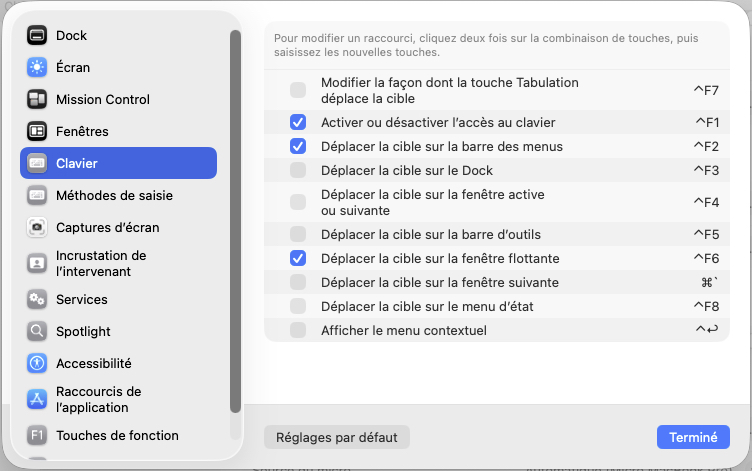
If you are not using F14 and F15 to adjust the screen brightness, note that those hotkeys can be turned off under System Settings > Keyboard > Keyboard Shortcuts… > Display.
Good evening Kevin, and thank you for your replies.
In my case, I don't want to use the F14 key to lowethe screen brightness, but to launch a search in Obsidian (which I already do with the F14 key on my Bluetooth keyboard connected to my MBP when I'm at home).
I read the post you mentioned ("Problem simulating a keystroke")
and checked that Keyboard Maestro Engine.app was listed in System Preferences>Accessibility.
I'm not sure what else I could do (the rest of the discussion is a bit too technical for me).
I also wonder if this might be related to another issue I recently raised ( Problem with conflict palette ) that I thought was resolved but has reappeared.
Hi, you’re welcome, and I’m sorry to hear that the mystery has not been solved.
As the next step, I would suggest disabling accessibility permissions for both Keyboard Maestro and the Keyboard Maestro Engine and then enabling them again. This can be done under System Settings > Privacy & Security > Accessibility.
In the unlikely event that you find that you are unable to change the settings, see this page of the Wiki: Accessibility Permission Problem.
Then revise the Troubleshooting page. If you are still stuck, and no Tahoe experts here are able to advise, I think you will have to be directed in further experiments by @peternlewis.
By the way, Peter, the final section of the Troubleshooting page needs a refresh: the link to the “Troubleshooting page of the Keyboard Maestro documentation” goes to a page for KM V. 6 (should there even be two troubleshooting pages?) and the two external links are for a dead site.
So I learn that my usage of the word “revise” will be alien to most Americans!
1 examine and make corrections or alterations to… [etc.]
2 (no object) British Englishreread work done previously to improve one's knowledge of a subject, typically to prepare for an examination: students frantically revising for exams | [with object] : revise your lecture notes on the topic.
– MacOS’s Dictionary application, when loaded with the “Oxford Dictionary of English (English (UK))”.
The “work done previously” bit deserves a “[sic]” but the definition is better than some I have seen online, if only by virtue of including the word “typically”!
No apology is necessary, other than for my misapprehension that you were American (which was not an assumption but an incorrect inference based on previous posts!).
Nevertheless, it is still the case that I have learned that my usage of “revise” was in British English, and thus alien to most Americans—and to native speakers of other dialects too!
Thanks for your response.
I tried “disabling accessibility permissions for both Keyboard Maestro and the Keyboard Maestro Engine and then enabling them again”
Without success.
but my problem with F14 has not been resolved
(note that F14 works correctly as a hotkey on my external Bluetooth keyboard, it is the ‘Simulate Keystroke’ action that does not work)
I have a few ideas, but there's a fair chance I'm wrong. That's often the case when I give advice. If you want certainty, then don't read any of my posts.
Second, do you have all the function keys (F1 to F12) disabled in the macOS System Settings Keyboard Shortcut panes? There are over a dozen panes so you will have to check each one. I can't check that for you, of course.
If neither of those things fix your problem, my guess is that the engineers who built the firmware for MacBooks decided that the setting in the image above would not fix the keys past F12. In that case, to simulate those keys (eg, F13) you may have to press the Globe Key while simulating the key. Unfortunately, the KM action to simulate a hardware key doesn't include the Globe modifier, and that's because the Globe key as a modifier doesn't modify the key inside macOS, but inside the keyboard itself, so it's physically impossible to use any code inside the Mac to simulate the Globe key as a modifier.
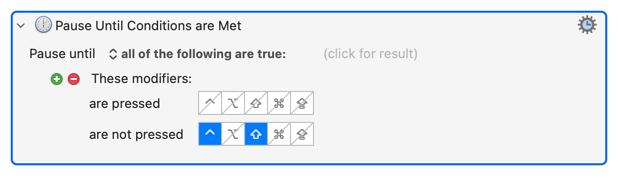
As the first action in your macro(s) put in a "Pause Until..." so that your simulated key press does not happen until you've released the hot key modifier keys. So for your ⌃⇧G trigger:
It sounds like your macro is running, the key press is being simulated, but because the Control-modified F keys are set to do something that's invalid in your current context you're getting the "beep" sound.
Again -- the fact that you are getting an alert sound suggests that either a) your ⌃⇧G hot key isn't valid for the context you are in or, b) the simulated key stroke isn't valid.
We know your trigger is valid because the macro works when you swap the action for the AS send key code. We know your simulated F14 is being sent, else you wouldn't get the alert. Yet we know a real F14 is valid because it works from your Bluetooth keyboard.
Tricky...
Making things worse... In my limited testing, Obsidian -- being an Electron app -- doesn't "alert" to invalid keystrokes in the usual macOS way. It simply ignores them. So where's the alert coming from?
The “correct” answer may be the one given by Kevin above:
"Catalina does not support triggering hot keys with simulated keys for function keys or arrow keys, but strangely does allow it for other keys. Whether this is a bug or a “feature” is unknown. "…
Except, weirdly, for (and only for, by your testing) F8.
Which is why I'm not convinced...
I've a (grindingly slow) Tahoe download happening on a test laptop right now. Once that's updated, and assuming I don't have to spend the whole afternoon telling people that it's not my fault Cloudflare's broken and there's nothing I can do to fix it , I'll see if I can reproduce the problem.



 , I'll see if I can reproduce the problem.